Simple Turtle LOGO download for android 14 (Upside Down Cake)
APK file SimpleTurtle Logo 2.11 compatible with Android 14How to install APK / APKS / OBB file on Android
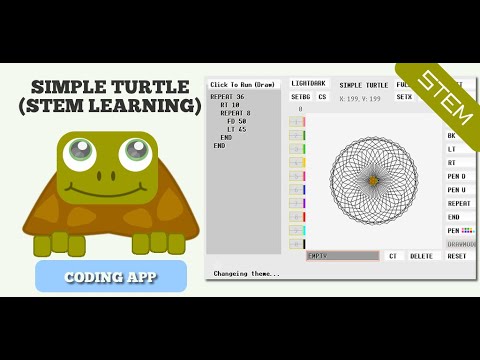

Learn to Code with the Simple Turtle STEM coding app, create simple programming code with Turtle LOGO commands to control your Turtle and draw fun images and designs.
Learn the basic coding of LOGO and have fun.
DRAWMODE is used to Toggle INSTANT DRAW mode ON / OFF
* New Keyboard feature added - Tap the cursor line to activate it *
Learn & experiment to create amazing Turtle Graphics.
Ideal for STEM education & learning.
How to use: Perform drawing, repeat loops and 2D actions. No Procedures or Printing
Fast, Easy and Fun coding app for students TAP the commands you want, then ADD COMMANDS them to your program! Hit RUN button when done! Use REPEAT for more advanced designs.
Tips:
1. Tap commands (or use keyboard)to appear in bottom, then hit "Add Commands".
2. Your current program code is now displayed on the left.
3. Tap "Run" to execute
If you make a mistake hit Clear Screen (CS) or RESET to start again.
Key Features:
- Simple Loops and Nested Loops.
- Create great patterns and designs using code and mathematics.
- Simple Tap GUI system for all commands.
Educational STEM programming app for teaching coding to beginners, using the Point and Click commands. Useful for your Logo exams or STEM learning events. Ideal for early computing students and stem education projects. Helps improve math skills too.
Follows close to the Logo standard
Step 1. Press code Commands on right side, press number values on left
e.g.
FD 50
LF 35
NEW! Nested loops - recursive to multiple levels
e.g. Nesting
REPEAT 5
....another repeat...etc
END
Step 2. Then Hit '< ADD COMMANDS' to add the current bottom line of code to your program listing shown on the left of the screen.
(repeat 1 & 2 to add more lines to your program)
Step 3. Hit 'Click to Run' to draw using your code
Remember to hit 'Click to RUN' when you want to execute your commands
New since version 1.14 - Added DRAW MODE to toggle moving Turtle instantly after each single line of commands. Some users seem to expect this, so I have added it as an option.
Hit DRAWMODE and then the "< ADD COMMANDS" to activate - do same again to deactivate.
Turtle app for use with larger screens. Fun activity coding app for STEM and helping users to learn to code.
Tap on code commands on the right and then the number values on the left, then tap 'Add Commands' after a line of commands is ready. Then press DELETE to reset line etc.
NOTE: Pressing DELETE on an empty line deletes your program on the left.
Example of Computer Programming with Logo:
PEN 1
REPEAT 5
FD 10
LT 30
BK 5
LT 20
FD 20
END
Sample Shapes
============
Triangle
REPEAT 3 FD 50 RT 120 END
Hexagon
REPEAT 6 FD 50 RT 60 END
Programming / Code Commands:
FD x = Forward Turtle x pixels
BK x = Backward x pixels
RT x = Right Turn Turtle by x degrees
LT x = Left Turn Turtle by x degrees
PU = Pen Up (Do not draw while moving)
PD = Pen Down (Draw as normal)
REPEAT x = Creates a loop to run x times which runs any commands within the loop. Place END when closing loop.
END = Closes a REPEAT loop. (Loops can be nested)
PEN x = Color of pen (0 - 7)
ENTER COMMAND = Adds current line to Actions List
DRAWMODE = Toggles Turtle movement to be Instant OR to wait for Run command.
DELETE = Clears the command line first, then the Deletes program Action list one command at a time.
RESET = Clears commands and resets your Turtle
QUIT = Exits the program
New: Brackets mode [ ], PE Penerase, Hide / Show Turtle, Longform command support if users wish to use longer command names
e.g. Forward = FD, Back = BK
- Android 13 improvements
- LicenseFree
- File nameSimpleTurtle Logo
- File Version2.11
- Package namecom.gazzappergames.simpleturtle.logo.educational
- Size8.17 MB
- UploadedMay 23, 2024
- Android7.0 or later
- CategoryEducation
- DeveloperGazzapper Games
- Developer site
- Developer emailkelticsupport@gmail.com
- md5 hashd4023589ef4bcf1a350622af93a11044
- Architecturearm64-v8a armeabi-v7a x86_64 x86
- Permissionsshow (3)